1. 텐서(Tensor)
- 일반적으로 텐서는 3차원 이상을 다룰 때 표현하는 방식이지만, 여기서는 어떠한 데이터를 표현할 때, 그 값 모두를 텐서라고 부르기로 함
- 아래에서 a, b, c, d 모두 텐서라고 지칭할 수 있
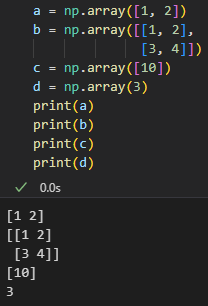
- 랭크(rank): 텐서의 축을 나타내고, 넘파이(numpy)의 ndim(number of dimension, 차원의 수)이라는 속성값으로 구할 수 있음
- 대괄호의 개수가 곧 랭크(축)의 값
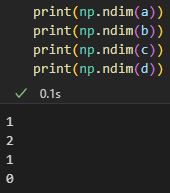
- 크기(shape): 텐서의 각 축을 따라 얼마나 많은 차원이 있는지를 나타내며, 파이썬의 튜플 형태
- 스칼라(0차원 텐서)
- 하나의 숫자를 담고 있는 텐서
- 형상은 없음
x = np.array(3)
print(x)
print(x.shape)
print(np.ndim(x))

# 출력 결과
3
()
0
- 벡터(1차원 텐서)
- 숫자의 배열을 나타내는 텐서
x = np.array([1, 2, 3, 4])
print(x)
print(x.shape)
print(np.ndim(x))

# 출력 결과
[1 2 3 4]
(4,)
1
- 벡터의 합
- 같은 형상(shape)일 때, 각 원소별로 계산
a = np.array([1, 2, 3, 4])
b = np.array([5, 6, 7, 8])
c = a + b
print(a)
print(b)
print(c)
print(c.shape)
print(np.ndim(c))

# 출력 결과
[1 2 3 4]
[5 6 7 8]
[ 6  8 10 12]
(4,)
1
- 벡터의 곱
- \(A=(x_{1}, x_{2}, x_{3}, \cdots, x_{n})\)
\(B=(y_{1}, y_{2}, y_{3}, \cdots, y_{n})\) 일 때, - 원소곱
- 같은 형상(shape)일 때, 각 원소별로 계산
\(A\times B=(x_{1}, x_{2}, x_{3}, \cdots, x_{n})\times (y_{1}, y_{2}, y_{3}, \cdots, y_{n})\)
\(b\;\qquad=(x_{1}y_{1}, x_{2}y_{2}, x_{3}y_{3}, \cdots, x_{n}y_{n})\)
- 같은 형상(shape)일 때, 각 원소별로 계산
- 벡터곱(product, dot)
- 두 1차원 벡터가 있을 때 각각의 성분끼리의 곱을 모두 더하는 계산
$$ A\bullet B\Rightarrow A \times B^{T}=(x_{1}, x_{2}, x_{3}, \cdots x_{n})\begin{pmatrix}
y_{1} \\
y_{2} \\
y_{3} \\
\vdots \\
y_{n} \\
\end{pmatrix} \\=(x_{1}y_{1} + x_{2}y_{2} + x_{3}y_{3} + \cdots + x_{n}y_{n}$$
# 원소곱
a = np.array([1, 2, 3, 4])
b = np.array([5, 6, 7, 8])
c = a*b
print(c)
print(c.shape)
print(np.ndim(c))
print("-------------------------")
# 벡터곱
x = np.array([1, 2, 0])
y = np.array([0, 2, 1])
z = np.dot(x, y)
print(z)
print(z.shape)
print(np.ndim(z))

# 출력 결과
[ 5 12 21 32]
(4,)
1
-------------------------
4
()
0
- 스칼라와 벡터의 곱
# 스칼라
a = np.array(10)
# 벡터
b = np.array([1, 2, 3])
print(a*b)

# 출력 결과
[10 20 30]
2. 2차원 텐서(행렬)
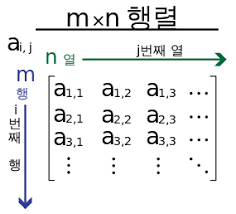
- 2차원 텐서는 행렬로 생각할 수 있음
- (m\(\times\)n)형상의 배열
matrix = np.array([[1, 2, 3],
                   [4, 5, 6]])
print(matrix)
print(matrix.shape)
print(np.ndim(matrix))
print("-------------------------")
matrix2 = np.array([[1, 2, 3, 4]])
print(matrix2)
print(matrix2.shape)
print(np.ndim(matrix2))

# 출력 결과
[[1 2 3]
 [4 5 6]]
(2, 3)
2
-------------------------
[[1 2 3 4]]
(1, 4)
2
- 행렬 원소곱
- 같은 형상(shape)일 때 덧셈, 곱셈과 같은 연산은 원소별로 진행
A = np.array([[1, 2], [3, 4]])
B = np.array([[10, 10], [10, 10]])
print("행렬 A\n", A)
print("행렬 B\n", B)
print("A * B\n", A*B)

# 출력 결과
행렬 A
 [[1 2]
 [3 4]]
행렬 B
 [[10 10]
 [10 10]]
A * B
 [[10 20]
 [30 40]]
- 행렬 점곱(내적, product)
- 1차원 벡터와 마찬가지로 앞 행렬과 뒤 행렬의 수가 같아야함
# 2*2 행렬
M = np.array([[1, 2], [3, 4]])
# 2*3 행렬
N = np.array([[2, 3, 4], [2, 3, 4]])
# 앞 행렬의 열과 뒤 행렬의 행이 같아 행렬 점곱이 가능
print("행렬 M\n", M)
print("행렬 N\n", N)
L = np.dot(M, N)
print("행렬 L\n", L)
print(L.shape)
print(np.ndim(L))

# 출력 결과
행렬 M
 [[1 2]
 [3 4]]
행렬 N
 [[2 3 4]
 [2 3 4]]
행렬 L
 [[ 6  9 12]
 [14 21 28]]
(2, 3)
2
# 3*1 행렬
m = np.array([[1], [2], [3]])
# 3*1행렬
n = np.array([[1], [2], [3]])
# 앞 행렬의 열과 뒤 행렬의 행이 달라 행렬 점곱이 불가능
l = np.dot(m, n)
print(l)
print(l.shape)
print(np.ndim(l))
# 출력 결과
ValueError: shapes (3,1) and (3,1) not aligned: 1 (dim 1) != 3 (dim 0)
- 역행렬
- 어떤 행렬 A가 있을 때, 곱해서 단위행렬(E)를 만드는 행렬 B가 존재한다면, 행렬 B는 A의 역행렬
A = np.array([[1, 2], [3, 4]])
B = np.linalg.inv(A)
print(A)
print(B)
print(np.dot(A, B))

# 출력 결과
[[1 2]
 [3 4]]
[[-2.   1. ]
 [ 1.5 -0.5]]
 # A 행렬과 A 행렬의 역행렬을 곱하여 단위행렬이 나옴
[[1.00000000e+00 1.11022302e-16]
 [0.00000000e+00 1.00000000e+00]]
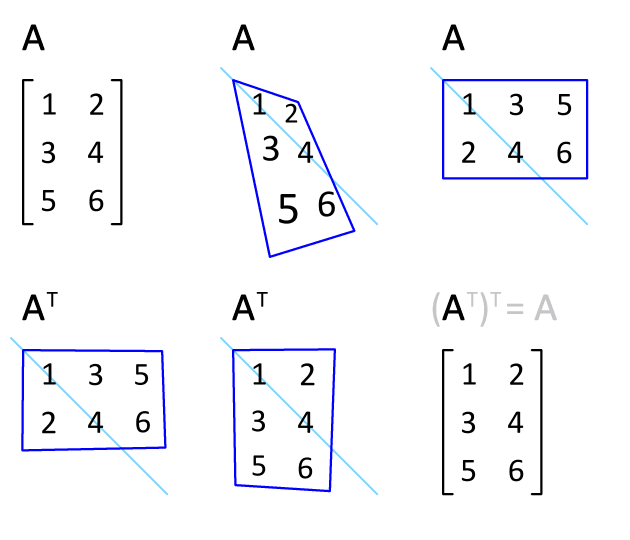
- 전치행렬
- 행과 열을 바꾼 배열의 형태
A = np.array([[1, 2, 3], [4, 5, 6]])
print("A\n", A)
print("A.shape\n", A.shape)
print("-------------------------")
A_ = A.T
print("A의 전치행렬\n", A_)
print("(A.T).shape\n", A_.shape)

# 출력 결과
A
 [[1 2 3]
 [4 5 6]]
A.shape
 (2, 3)
-------------------------
A의 전치행렬
 [[1 4]
 [2 5]
 [3 6]]
(A.T).shape
 (3, 2)
3. 3차원 텐서
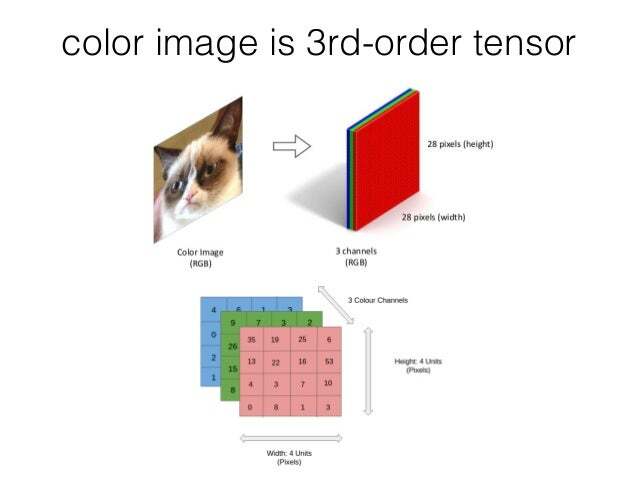
- 보통 이미지를 나타낼 때 사용되는 텐서
- (width, height, channels)
- 일반적으로 Numpy Array로 표현
- 시계열 데이터 또는 시퀀스(sequence) 데이터를 표현할 때도 사용
- (samples, timesteps, features)
- (예시) 주식 가격 데이터셋, 시간에 따른 질병 발병 건수
X = np.array([[[5, 3, 2, 1],
               [5, 5, 3, 1],
               [6, 1, 2, 3]],
              [[1, 1, 1, 1],
               [3, 4, 7, 5],
               [1, 8, 3, 4]],
               [[10, 9, 3, 9],
                [5, 4, 3, 2],
                [7, 6, 3, 4]]])

print("X\n", X, end = '\n\n')
print("X.shape:", X.shape)
print("X.ndim:", X.ndim)

# 출력 결과
X
 [[[ 5  3  2  1]
  [ 5  5  3  1]
  [ 6  1  2  3]]

 [[ 1  1  1  1]
  [ 3  4  7  5]
  [ 1  8  3  4]]

 [[10  9  3  9]
  [ 5  4  3  2]
  [ 7  6  3  4]]]

X.shape: (3, 3, 4)
X.ndim: 3
B = np.array([[[2, 3, 4],[2, 3, 4]],
[[1, 1, 1], [1, 1, 1]]])
print("행렬 B\n", B, end = '\n\n')
print("B의 전치행렬\n", B.T)
# 출력 결과
행렬 B
[[[2 3 4]
[2 3 4]]
[[1 1 1]
[1 1 1]]]
B의 전치행렬
[[[2 1]
[2 1]]
[[3 1]
[3 1]]
[[4 1]
[4 1]]]
- 3차원 텐서 활용 예시(이미지)
- MNIST Dataset
- 28\(\times\)28 사이즈의 gray scale 이미지들로 구성
- gray scale: 0~255의 값을 통해 밝기를 포현, 0으로 갈수록 어두워지고, 255로 갈수록 밝아짐
# %pip install keras
# %pip install tensorflow
from keras.datasets import mnist

(train_images, train_labels), (test_images, test_labels) = mnist.load_data()
print(train_images.ndim)
print(train_images.shape)
print(train_images.dtype)
# 출력 결과
3
(60000, 28, 28)
uint8temp_image = train_images[3]
plt.imshow(temp_image, cmap = 'gray')
plt.show()
4. 브로드캐스팅(broadcasting)
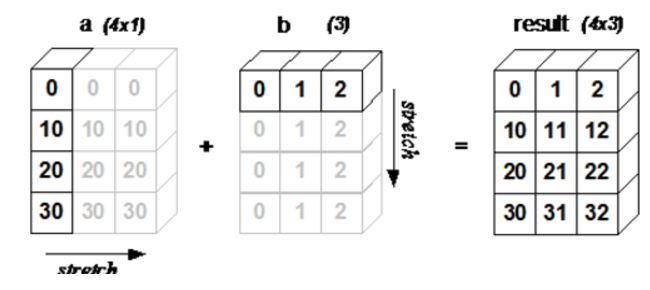
- 넘파이에서 다른 형상(shape)끼리 계산 가능
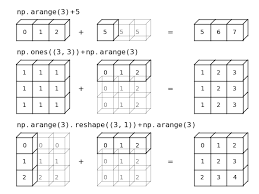
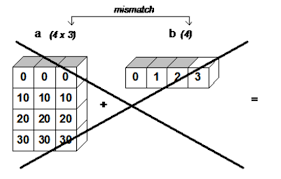
- 더 작은 형상(shape)이 형상이 더 큰 배열에 확장이 가능해야함
- (참고) 아래의 경우도 가능
# 1차원 텐서
a = np.array(10)
b = np.array([10, 20, 30])
print(np.dot(a, b))
print(a*b)

# 서로 shape이 다르지만 브로드캐스팅을 통해 계산이 가능하도록 만들어짐
# 출력 결과
[100 200 300]
[100 200 300]
# 2차원 텐서
A = np.array([[1, 2], [3, 4]])
B = np.array([10, 20])
print("행렬 A\n", A)
print("행렬 B\n", B)
print("A * B\n", A*B)
# 출력 결과
행렬 A
[[1 2]
[3 4]]
행렬 B
[10 20]
A * B
[[10 40]
[30 80]]# 3차원 텐서
A = np.array([[[1, 1, 1],
[2, 2, 2]],
[[3, 3, 3],
[4, 4, 4]]])
B = np.array([[10, 10, 10]])
print("행렬 A\n", A)
print("A.shape:", A.shape)
print("행렬 B\n", B)
print("B.shape:", B.shape)
print("A * B\n", A*B)
# 출력 결과
행렬 A
[[[1 1 1]
[2 2 2]]
[[3 3 3]
[4 4 4]]]
A.shape: (2, 2, 3)
행렬 B
[[10 10 10]]
B.shape: (1, 3)
A * B
[[[10 10 10]
[20 20 20]]
[[30 30 30]
[40 40 40]]]# 브로드캐스팅 조건에 맞지 않는 경우
# 2*3 행렬
A = np.array([[1, 2, 3], [4, 5, 6]])
# 1*2 행렬
B = np.array([10, 10])
print(A*B)
# 출력 결과
ValueError: operands could not be broadcast together with shapes (2,3) (2,)
5. 4, 5차원 텐서
- Color Image Datasets(4차원)
- (samples, heigth, width, channels) (Keras, Tensorflow)
- (samples, channels, height, width) (Pytorch)
- 동영상(5차원)
- (samples, frames, heigth, width, channels) (Keras, Tensorflow)
- (samples, frames, channels, height, width) (Pytorch)
- 예시 1) (4, 300, 1920, 1080, 3) → 1920×1080 사이즈 3채널의 300프레임 수를 가진 배치가 4
6. 텐서 크기 변환
- reshape으로 텐서의 크기 변환 가능
- 변환 전의 원소의 개수와 변환 이후의 텐서의 개수가 같아야 함
A = np.array([[1, 2, 3], [4, 5, 6]])
print("행렬 A\n", A)
print("A.shape:", A.shape)
print("-------------------------")
# 그냥 1차원의 배열로 쭉 나열
A = A.reshape(6)
print("행렬 A\n", A)
print("A.shape:", A.shape)

# 출력 결과
행렬 A
 [[1 2 3]
 [4 5 6]]
A.shape: (2, 3)
-------------------------
행렬 A
 [1 2 3 4 5 6]
A.shape: (6,)
B = np.array([[[2, 3, 4], [2, 3, 4]],
[[1, 1, 1], [1, 1, 1]]])
print("행렬 B\n", B)
print("B.shape:", B.shape)
print("-------------------------")
# 2*2*3 배열에서 3*4 배열로 변환
B = B.reshape(3, 4)
print("행렬 B\n", B)
print("B.shape:", B.shape)
# 출력 결과
행렬 B
[[[2 3 4]
[2 3 4]]
[[1 1 1]
[1 1 1]]]
B.shape: (2, 2, 3)
-------------------------
행렬 B
[[2 3 4 2]
[3 4 1 1]
[1 1 1 1]]
B.shape: (3, 4)- -1을 통해 자동으로 형상을 지정 가능
- 원소의 개수에 맞게 넘파이가 자동으로 형상을 지정
- (2, 2, 3) → (3, -1) (o)
→ (2, 1, 6) (o)
→ (2, -1, -1) (x)
→ (2, 5, -1) (x)
- (2, 2, 3) → (3, -1) (o)
B = np.array([[[2, 3, 4], [2, 3, 4]],
              [[1, 1, 1], [1, 1, 1]]])
print("행렬 B\n", B)
print("B.shape:", B.shape)
print("-------------------------")
# 행만 4로 지정하고 열은 넘파이가 자동으로 계산하여 4*3 배열로 변환
B = B.reshape(4, -1)
print("행렬 B\n", B)
print("B.shape:", B.shape)

# 출력 결과
행렬 B
 [[[2 3 4]
  [2 3 4]]

 [[1 1 1]
  [1 1 1]]]
B.shape: (2, 2, 3)
-------------------------
행렬 B
 [[2 3 4]
 [2 3 4]
 [1 1 1]
 [1 1 1]]
B.shape: (4, 3)'Python > Deep Learning' 카테고리의 다른 글
| [딥러닝 기초] 신경망 학습 (0) | 2023.03.14 |
|---|---|
| [딥러닝 기초] 경사하강법 (0) | 2023.03.13 |
| [딥러닝 기초] 모델 학습과 손실 함수 (1) | 2023.03.12 |
| [딥러닝 기초] 신경망 구조 (0) | 2023.03.09 |
| [딥러닝 기초] 신경망 기초수학 (0) | 2023.03.06 |